

Approvals
The Approvals page is the organization-wide Human-in-the-Loop (HITL) queue. Review and act on pending approval requests.
Access from the sidebar by clicking Approvals. The badge shows the number of pending requests.
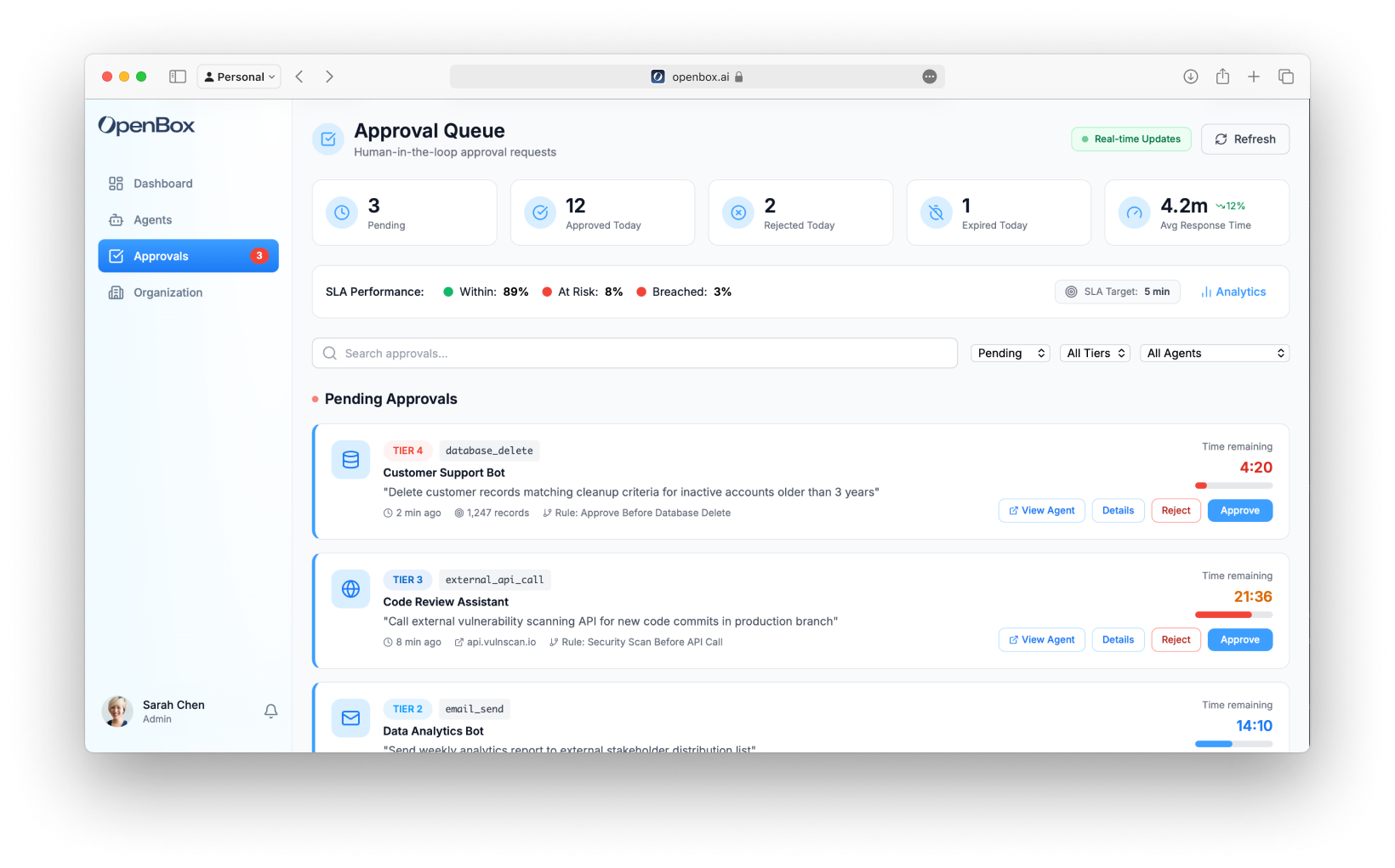
Real-Time Updates
The page updates in real-time. A green indicator shows "Real-time Updates" / "Live" status. Click Refresh to manually reload.
Stats Cards
Five metrics across the top:
| Metric | Description |
|---|---|
| Pending | Approval requests awaiting review (orange) |
| Approved Today | Requests approved in the last 24h (green) |
| Rejected Today | Requests rejected in the last 24h (red) |
| Expired Today | Requests that reached the 24h hard expiry (gray) |
| Avg Response Time | Average time to respond with trend indicator |
SLA Summary
A summary bar shows SLA performance:
- Within - Percentage of approvals resolved within SLA target (green)
- At Risk - Approaching SLA deadline (orange)
- Breached - Exceeded SLA target (red)
- SLA Target - Responsiveness goal for SLA reporting (Within / At Risk / Breached). Default: 5 min. Missing the SLA target does not expire the request.
- Hard expiry - Every approval auto-expires 24 hours after it is raised, independent of the SLA target. On expiry the operation does not proceed (treated as denied) and the rule's
on_timeoutbehavior (block or halt) applies. The UI shows a live countdown to this 24h deadline.
Click Analytics to view detailed SLA analytics.
Approval Queue
Status Filter
Use the status dropdown to filter the queue:
- Pending - Requests awaiting action
- Approved - Recently approved requests
- Rejected - Recently rejected requests
- Expired - Requests that reached the 24h hard expiry
Approval Cards
Each pending approval shows:
| Field | Description |
|---|---|
| Agent | Agent name, icon, and Trust Tier badge |
| Operation | What the agent is attempting |
| Session | Link to session for context |
| Time Pending | How long it's been waiting |
| SLA Status | Within SLA, At Risk, or Breached |
| Priority | Low, Medium, High, or Critical |
SLA Indicators
Each card shows SLA status:
- Green border - Within SLA target
- Orange border - At risk (>80% of SLA time elapsed)
- Red border - SLA breached
Approval Actions
For each pending request:
| Action | Description |
|---|---|
| View Agent | Open the agent detail page in a new tab |
| Details | View full details of the approval request |
| Reject | Block operation (requires reason) |
| Approve | Allow operation to proceed |
Processing Approvals
Approving
- Review the operation details
- Click Approve
- Optionally add a comment
- The operation resumes
Result:
- Activity retries and succeeds
- Event logged in audit trail
- Trust score unchanged
Rejecting
- Review the operation details
- Click Reject
- Enter a rejection reason (required)
- Confirm rejection
Result:
- Operation is rejected
- Counts as a rule trigger; a trust penalty applies only if the rule's threshold is exceeded in the rolling window (no flat per-event penalty)
- Event logged in audit trail
Expiry
Two independent clocks apply to every approval:
- SLA target (default 5 min) — a responsiveness goal for reporting only. Missing it moves the request to At Risk / Breached but does not expire it.
- Hard expiry (24h) — if no decision is made within 24 hours, the request auto-expires:
- The operation does not proceed — expiry is treated as a denial, and the rule's
on_timeoutsetting (block or halt) is applied. - The request appears in the "Expired Today" stat and under the "Expired" status filter.
- The operation does not proceed — expiry is treated as a denial, and the rule's
Expiry carries no flat trust penalty. Like any denied outcome it counts as one rule trigger; a trust penalty applies only if that rule's trigger count exceeds its threshold within the rolling window (see Trust Scores → Recovery).
Filtering
Filter the queue by:
- Priority - Low, Medium, High, Critical
- Agent - Specific agent
- Team - Owning team
- SLA Status - Within, At Risk, Breached
Next Steps
- Organization Settings - Manage teams, roles, and organization configuration
- Monitor Sessions - Review the full session context with Session Replay before approving or rejecting